Working
You must have heard of frontend and backend. Frontend refers to the visible part of a website or app that users interact with, like tables, images, and buttons. It's built using languages like HTML, CSS, and JavaScript.
The backend, on the other hand, handles behind-the-scenes operations like storing and processing data when users interact with the frontend. It uses languages like Python, Ruby, and Java.
In essence, frontend is what users see, while backend manages the functionality.
How Do Websites Work?
When we want to access any information on the internet, we search for it using a web browser. The web browser retrieves the content from web servers, where it is stored in the form of HTML documents.
An HTML document is created by writing code with specific tags in a code
editor of your choice. The document is then saved with the
.html extension.
Once saved, the browser interprets the HTML document, reads it, and renders the web page.
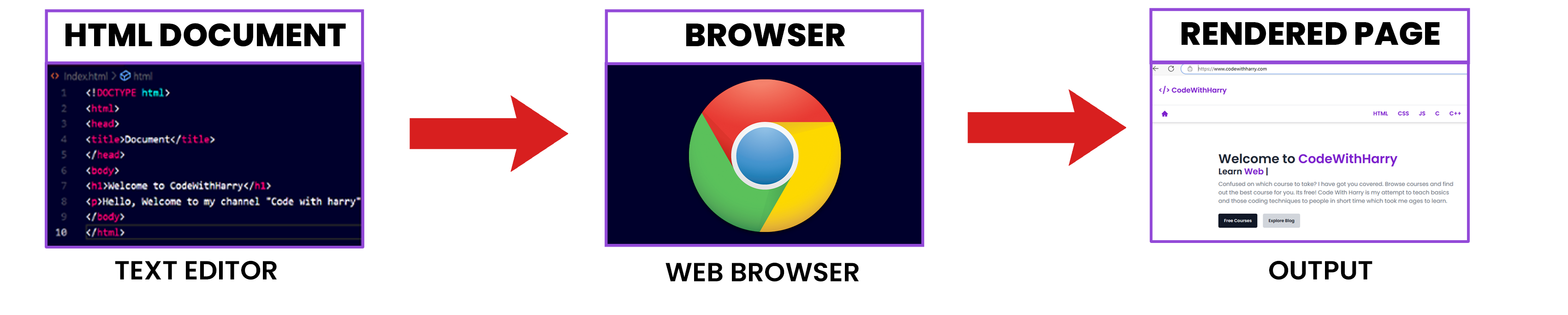
The text editor contains the HTML code of a website. This website can now be viewed in a beautifully rendered format using a computer program known as a web browser.
What is a Web Browser?
A web browser is a program that understands HTML tags and renders them in a human-readable format that is easily viewable by people visiting the website.
Developers write code in HTML because it's a straightforward way to instruct the web browser on what to display.
In the next section, I'll show you how to set up VS Code for writing your own HTML code and rendering it in a web browser.
What is an HTML Document?
An HTML document is a text document saved with the
.html or .htm extension, containing text and
specific tags enclosed in < >.
These tags provide the necessary instructions for configuring the web page. The tags themselves are standardized and fixed.
The structure of an HTML document will be explained later in this HTML tutorial.
What is a Rendered Page?
The rendered page is the output of our HTML document. It is the page that is displayed by the web browser after processing the HTML code.
How Does a Basic Website Work?
-
The web browser (client) requests a website such as
course.shadowcraft.infrom the web server. - The web server sends the required HTML, CSS, and JavaScript files back to the browser.
- The web browser parses these HTML, CSS, and JavaScript files and uses them to display the website.
How Does a Browser Work?
A web browser plays a crucial role in parsing and rendering HTML code for the client. A web browser is a complex program that performs many tasks behind the scenes.
Here's a simplified summary of how it works:
1. Browser Reads the HTML Document
A browser is an application that reads HTML documents and displays them as web pages. Browsers can't access content directly from where it is stored; this is where servers come into play.
2. Server Handles the Request
A server acts as an intermediary, listening to browser requests and fulfilling them by delivering the requested HTML document and other resources to the browser.
3. Parsing
Web browsers perform two main tasks: parsing and rendering.
During the parsing stage, the browser receives raw bytes, which are converted into characters. These characters are then converted into tokens, which in turn are transformed into nodes.
These nodes are organized into a tree-like data structure known as the DOM (Document Object Model).
4. Rendering
Once the DOM tree is constructed, the browser moves on to the rendering stage.
At this point, the browser processes the document and its associated styles and resources to determine what should be displayed on the screen. The resulting webpage is then rendered and displayed to the user.
In the next tutorial, we will install VS Code and some useful extensions for writing our HTML code.