Tags
If you want to build a beautiful website, tags are essential elements that help you achieve that.
An HTML tag acts as a container for content or other HTML tags. Tags are words enclosed within < and > angle brackets.
They serve as keywords that instruct the web browser on how to format and display the content.
Commonly Used Tags in HTML
Here are some commonly used tags in HTML. These are some of the tags you will use frequently while building websites.
Document Structure Tags
<!DOCTYPE html>: Specifies the document type.<html>: Encloses the entire HTML document.<head>: Contains meta-information and links to scripts and stylesheets.<body>: Contains the content of the web page.
Metadata Tags
<title>: Sets the title of the web page.<meta>: Provides metadata such as character set, author, and viewport settings.<link>: Links external resources like stylesheets.
Text Formatting Tags
<p>: Paragraph.-
<h1>,<h2>,<h3>,<h4>,<h5>,<h6>: Headings. <strong>: Strong emphasis, typically displayed in bold.<em>: Emphasis, typically displayed in italic.<br>: Line break.<hr>: Horizontal rule.
List Tags
<ul>: Unordered list.<ol>: Ordered list.<li>: List item.
Hyperlink and Media Tags
<a>: Anchor element used to create links.<img>: Displays an image.<audio>: Embeds audio content.<video>: Embeds video content.
Form Tags
<form>: Defines an HTML form.<input>: Creates an input field.<textarea>: Creates a multi-line text area.<button>: Creates a button.<select>: Creates a dropdown list.<option>: Defines an option inside a<select>element.
Table Tags
<table>: Defines a table.<tr>: Defines a table row.<td>: Defines a table data cell.<th>: Defines a table header cell.<thead>: Defines the table header group.<tbody>: Defines the table body group.<tfoot>: Defines the table footer group.
Semantic Tags
<header>: Defines a header section.<footer>: Defines a footer section.<article>: Defines an independent article or piece of content.<section>: Defines a section of content.<nav>: Defines navigation links.<aside>: Defines related or sidebar content.
Paired and Unpaired HTML Tags
Well, that was a really long list. Don't worry, we will study these in detail. In HTML, tags can be broadly categorized into two types:
1. Paired Tags (Container Tags)
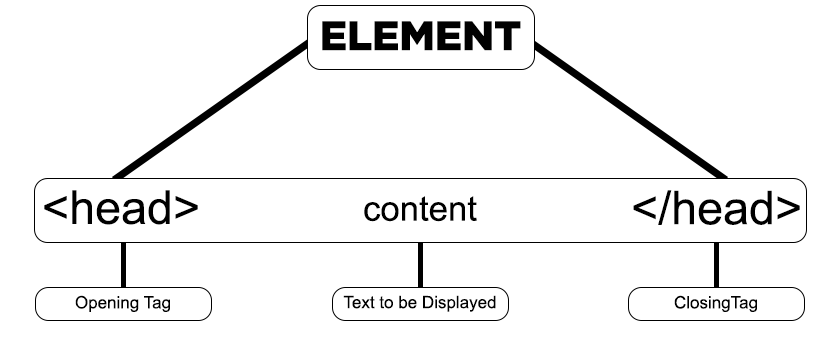
These are tags that come in pairs, consisting of an opening tag and a corresponding closing tag. The content goes between these two tags.
Opening Tag
The opening tag starts with < and ends with >. For example:
<p>Closing Tag
The closing tag also starts with < but includes a forward slash / before the tag name and ends with >.
For example:
</p>Examples
-
Paragraph:
<p>This is a paragraph.</p> -
Heading:
<h1>This is a heading.</h1>
2. Unpaired Tags (Self-Closing or Stand-Alone Tags)
These are tags that don't require a closing tag. They are self-contained and contain all the information they need within a single element.
Self-Closing Tag
A self-closing tag starts with < and ends with />. However, the forward slash is optional in HTML5.
For example:
<img />Or:
<br>Examples of Stand-Alone Tags
-
Line Break:
<br /> -
Horizontal Rule:
<hr /> -
Image:
<img src="image.jpg" alt="An example image" />
Pictorial Representation of Tags
The image below offers a visual representation of how tags are structured in HTML. As you can see, an element can contain other elements, which may also contain additional elements, forming a tree-like structure.
This hierarchy can include void elements as well as nested elements, as illustrated in the picture.